<?xml version="1.0" encoding="utf-8"?><feed xmlns="http://www.w3.org/2005/Atom" ><generator uri="https://jekyllrb.com/" version="3.10.0">Jekyll</generator><link href="https://ladnopoka.github.io//feed.xml" rel="self" type="application/atom+xml" /><link href="https://ladnopoka.github.io//" rel="alternate" type="text/html" /><updated>2025-10-04T15:33:47+00:00</updated><id>https://ladnopoka.github.io//feed.xml</id><title type="html">Ladno Developer Portfolio</title><subtitle>Software and Games</subtitle><author><name>Jevgenij Ivanov</name></author><entry><title type="html">RIPClips.org</title><link href="https://ladnopoka.github.io//websites/2025/10/04/ripclips.html" rel="alternate" type="text/html" title="RIPClips.org" /><published>2025-10-04T00:00:00+00:00</published><updated>2025-10-04T00:00:00+00:00</updated><id>https://ladnopoka.github.io//websites/2025/10/04/ripclips</id><content type="html" xml:base="https://ladnopoka.github.io//websites/2025/10/04/ripclips.html"><![CDATA[<div style="text-align: center; margin-top: -30px; margin-bottom: 25px; scale: 1">
  <a href="https://ripclips.org" target="_blank" class="btn btn-primary" style="padding: 10px 20px; font-size: 1.2em;">Visit RIPClips.org</a>
  <a href="https://github.com/Ladnopoka/ripclips.org" target="_blank" class="btn btn-primary" style="padding: 10px 20px; font-size: 1.2em;">GitHub Repository</a>
</div>

<h1 id="what-is-ripclips">What is RIPClips?</h1>

<h3 style="font-size: 25px">
RIPClips is a community-driven platform where gamers can watch the most epic Hardcore RIP moments from streamers, content creators and players. Whether you just lost your level 95 Path of Exile character to a random one-shot mechanic or watched your Diablo hardcore character get destroyed by Duriel, this is where those moments become legendary.
</h3>

<h2 id="features">Features</h2>

<ul>
  <li><strong>Watch</strong> the most epic Hardcore RIP moments from streamers and content creators</li>
  <li><strong>Share</strong> your own painful and hilarious character RIPs</li>
  <li><strong>Discover</strong> clips from popular ARPG games like Path of Exile, Last Epoch, and Diablo</li>
  <li><strong>Comment</strong> and react to the community’s most memorable fails</li>
</ul>

<h2 id="sharing-your-rip-clips">Sharing Your RIP Clips</h2>

<p>Got an epic RIP moment you want to share with the world? Here’s how:</p>

<ol>
  <li>Go to <strong>“Submit”</strong> in the website header (top right)</li>
  <li><strong>Paste your Twitch or YouTube clip URL</strong> - that’s it!</li>
  <li>The site will automatically fill in the streamer name, game, and clip title</li>
  <li>Add a description if you want to tell the story behind the RIP</li>
  <li>Hit <strong>“Submit”</strong> and your clip goes to the submission box</li>
  <li>One of our admins will review the clip and approve it to the reel board</li>
</ol>

<h2 id="featured-games">Featured Games</h2>

<p>RIPClips specializes in ARPG (Action Role-Playing Game) content, especially:</p>

<ul>
  <li><strong>Path of Exile</strong> - Those brutal one-shots and lag RIPs</li>
  <li><strong>Last Epoch</strong> - Beta crashes and unexpected boss mechanics</li>
  <li><strong>Diablo IV</strong> - Hardcore character losses and world boss fails</li>
  <li><strong>Other ARPGs</strong> - Any game where character RIP hurts!</li>
</ul>

<h2 id="community-guidelines">Community Guidelines</h2>

<p>Keep RIPClips fun and welcoming for everyone:</p>

<ul>
  <li><strong>Be respectful</strong> - We’re all here to enjoy epic gaming fails</li>
  <li><strong>No spoilers</strong> - Let people discover the RIP moments naturally</li>
  <li><strong>Give credit</strong> - Make sure to properly attribute clips to their creators</li>
  <li><strong>Stay on topic</strong> - Focus on ARPG and gaming content</li>
  <li><strong>Have fun!</strong> - Remember, we’re all here because we love these games</li>
</ul>

<h2 id="feedback-and-business-inquiries">Feedback and Business Inquiries</h2>

<p><strong>Any Feedback is Welcome</strong></p>
<ul>
  <li>Send us an email with any feedback, questions, or requests</li>
  <li>We want to keep improving the website and add new features</li>
  <li>We listen closely to the community and work fast to solve problems</li>
  <li>We appreciate any bug reports or complaints</li>
</ul>

<p><strong>Business Inquiries - Contact us through email</strong></p>
<ul>
  <li>We are open to partnership and advertisements</li>
  <li>Are you a streamer that wants to get your channel or clips featured? Don’t hesitate and send us a mail</li>
  <li>Any other business inquiries are welcome</li>
</ul>

<h1 id="contact">Contact</h1>
<h5 id="for-any-inquiries-or-feedback-feel-free-to-reach-out-to">For any inquiries or feedback, feel free to reach out to:</h5>

<p><strong>Jevgenij Ivanov</strong> <br />
<strong>Email</strong>: ladnopokaa@gmail.com <br /><br />
<strong>GitHub</strong>: https://github.com/Ladnopoka <br />
<strong>itch.io</strong>: https://ladnogames.itch.io/ <br />
<strong>YouTube</strong>: https://www.youtube.com/@LadnoDev <br />
<strong>X</strong>: https://x.com/Ladnopokaa <br />
<strong>Discord</strong>: https://discord.gg/BPsncTZe</p>

<hr />

<p><em>Remember: Every RIP is just practice for the next character. Keep grinding, keep sharing, and keep the community laughing at our collective pain!</em> 💀⚡</p>]]></content><author><name>Jevgenij Ivanov</name></author><category term="websites" /><summary type="html"><![CDATA[Visit RIPClips.org GitHub Repository]]></summary></entry><entry><title type="html">Dungeon Forge</title><link href="https://ladnopoka.github.io//software/2024/03/26/dungeon-forge.html" rel="alternate" type="text/html" title="Dungeon Forge" /><published>2024-03-26T00:00:00+00:00</published><updated>2024-03-26T00:00:00+00:00</updated><id>https://ladnopoka.github.io//software/2024/03/26/dungeon-forge</id><content type="html" xml:base="https://ladnopoka.github.io//software/2024/03/26/dungeon-forge.html"><![CDATA[<div style="text-align: center; margin-top: -30px; margin-bottom: 25px; scale: 1">
  <a href="https://github.com/Ladnopoka/Godot-room-generator-plugin" target="_blank" class="btn btn-primary" style="padding: 10px 20px; font-size: 1.2em;">GitHub Repository</a>
</div>

<h1 id="overview">Overview</h1>
<h3 style="font-size: 25px">
  Dungeon Forge is a Godot 4 extension plugin that allows users to generate dungeon-like layouts in their scenes with a click of a button. This plugin opens a new window in the Godot 4 editor in the bottom right corner where users can select from three different biomes: dungeons, wooden cabins, and frozen caves. Upon selecting the gridmap generator in the menu, a new pop-up menu on the right allows users to set parameters for the dungeon layouts and then generate the layouts and meshes. Additional features include a first-person controller that allows users to explore generated dungeons, saving generated layouts, and reusing dungeons.
<br /><br />

The demonstration of the application can be viewed below:
</h3>
<div style="display: flex; justify-content: center; align-items: center; margin: 20px 0;">
    <iframe width="660" height="415" src="https://www.youtube.com/embed/dw3r8JJGyQ4?si=kLD1VK-v1A9r4Cv3" title="Dungeon Forge Demo" frameborder="0" allow="accelerometer; autoplay; clipboard-write; encrypted-media; gyroscope; picture-in-picture; web-share" referrerpolicy="strict-origin-when-cross-origin" allowfullscreen="">
    </iframe>
</div>

<h1 id="features">Features</h1>
<ul>
  <li><strong>Biome Selection</strong>: Choose from three biomes: dungeons, wooden cabins, and frozen caves.<br /></li>
  <li><strong>Gridmap Generator</strong>: Customize parameters and generate dungeon layouts and meshes.<br /></li>
  <li><strong>First Person Controller</strong>: Explore the generated dungeons in first-person view.<br /></li>
  <li><strong>Save and Reuse</strong>: Save generated layouts and reuse them in your scenes.<br /></li>
</ul>

<h1 id="in-future-development">In Future Development</h1>
<ul>
  <li><strong>Multiple Floor Layouts</strong>: Create multiple floors connected by ladders or stairs.<br /></li>
  <li><strong>Upload Your Mesh</strong>: Allow users to drag and drop their mesh to become the new theme they would use.<br /></li>
  <li><strong>Fix Bugs</strong>: Fix bugs. One big one currently is save disappearing on client restart. <br /></li>
</ul>

<h1 id="installation">Installation</h1>
<ol>
  <li>Clone https://github.com/Ladnopoka/Godot-room-generator-plugin.git</li>
  <li>Add the “addons/room-generator” folder to the “addons” folder in your Godot project</li>
  <li>In Godot editor, select “Project” in the top left corner</li>
  <li>Go to “Project Settings…”</li>
  <li>Go to “Plugins” tab</li>
  <li>Click “Enable” tick box for the “Dungeon Forge” plugin</li>
  <li>You should now see a new UI window appearing in bottom right corner of the editor</li>
  <li>To spawn a dungeon generator, select “Gridmap Generator” in either of the themes</li>
</ol>

<h1 id="contact">Contact</h1>
<h5 id="for-any-inquiries-or-feedback-feel-free-to-reach-out-to">For any inquiries or feedback, feel free to reach out to:</h5>

<p><strong>Jevgenij Ivanov</strong> <br />
<strong>Email</strong>: ladnopokaa@gmail.com <br /><br />
<strong>GitHub</strong>: https://github.com/Ladnopoka <br />
<strong>itch.io</strong>: https://ladnogames.itch.io/ <br />
<strong>YouTube</strong>: https://www.youtube.com/@LadnoDev <br />
<strong>X</strong>: https://x.com/Ladnopokaa <br />
<strong>Discord</strong>: https://discord.gg/BPsncTZe</p>]]></content><author><name>Jevgenij Ivanov</name></author><category term="software" /><summary type="html"><![CDATA[GitHub Repository]]></summary></entry><entry><title type="html">Spotify Playlist Enhancer</title><link href="https://ladnopoka.github.io//software/2024/01/12/spotify-playlist-enhancer.html" rel="alternate" type="text/html" title="Spotify Playlist Enhancer" /><published>2024-01-12T00:00:00+00:00</published><updated>2024-01-12T00:00:00+00:00</updated><id>https://ladnopoka.github.io//software/2024/01/12/spotify-playlist-enhancer</id><content type="html" xml:base="https://ladnopoka.github.io//software/2024/01/12/spotify-playlist-enhancer.html"><![CDATA[<div style="text-align: center; margin-top: -30px; margin-bottom: 25px; scale: 1">
  <a href="https://github.com/Ladnopoka/Spotify-Playlist-Enhancer" target="_blank" class="btn btn-primary" style="padding: 10px 20px; font-size: 1.2em;">GitHub Repository</a>
</div>

<h1 id="overview">Overview</h1>
<h3 style="font-size: 25px">
Google Chrome extension which allows you to connect to Spotify API fetch songs and playlist from your Spotify account.
This extension also allows you to retrieve your top 5 played tracks, and give you 5 recommendations based on these tracks, all with a couple of clicks through the extension UI.
Finally, you can generate a Spotify playlist with the songs that were recommended to you, and play these songs inside the extension right there and now.
When the playlists are generated, they are added to your Spotify account, however, in the extension UI, you can select to not keep the playlist if you don't like it after listening to the recommended songs.
<br /><br />

The demonstration of the application can be viewed below:
</h3>
<div style="display: flex; justify-content: center; align-items: center; margin: 20px 0;">
    <iframe width="660" height="415" src="https://www.youtube.com/embed/NTn2MuQhe8Q?si=fydHOFu14HMk2qo1" title="Spotify Playlist Enhancer Demo" frameborder="0" allow="accelerometer; autoplay; clipboard-write; encrypted-media; gyroscope; picture-in-picture; web-share" referrerpolicy="strict-origin-when-cross-origin" allowfullscreen="">
    </iframe>
</div>

<h1 id="features">Features</h1>
<ul>
  <li><strong>Authenticate Spotify Account</strong>: Securely connect your Spotify account to the extension.<br /></li>
  <li><strong>Top 5 Played Tracks</strong>: View your top 5 most played tracks on Spotify.<br /></li>
  <li><strong>Top 5 Recommended Tracks</strong>: Get recommendations from Spotify based on your top played tracks.<br /></li>
  <li><strong>Generate New Playlists</strong>: Create new playlists with new songs based on your top tracks and recommendations.<br /></li>
  <li><strong>Play Songs in Browser</strong>: Listen to your playlists directly within Google Chrome.<br /></li>
</ul>

<h1 id="in-development">In Development</h1>
<ul>
  <li><strong>Dynamic Playlist Manager</strong>: Drag and drop songs to create the perfect playlist.<br /></li>
  <li><strong>Customized Profile</strong>: Personalize your extension profile.<br /></li>
  <li><strong>Friend System</strong>: Connect with friends and share your music preferences.<br /></li>
</ul>

<h1 id="installation">Installation</h1>
<ol>
  <li>Clone https://github.com/Ladnopoka/Spotify-Playlist-Enhancer.git</li>
  <li>Go to ./spotify-playlist-enhancer directory</li>
  <li>Run command “npm install react-scripts”</li>
  <li>Run command “npm install fireabase”</li>
  <li>Run command “npm run build” in your terminal/console from spotify-playlist-enhancer directory</li>
  <li>The spotify-playlist-enhancer directory now has a new folder “build”</li>
  <li>Open your Google Chrome browser and go to your extensions</li>
  <li>In the top right corner of the extensions page, toggle developer mode</li>
  <li>A couple of new buttons appear, select “Load unpacked”</li>
  <li>Select the build folder that you created in step 2</li>
  <li>The extension now appears in your extensions, enable it and you will have the icon in extensions (top left corner)</li>
</ol>

<h1 id="contact">Contact</h1>
<h5 id="for-any-inquiries-or-feedback-feel-free-to-reach-out-to">For any inquiries or feedback, feel free to reach out to:</h5>

<p><strong>Jevgenij Ivanov</strong> <br />
<strong>Email</strong>: ladnopokaa@gmail.com <br /><br />
<strong>GitHub</strong>: https://github.com/Ladnopoka <br />
<strong>itch.io</strong>: https://ladnogames.itch.io/ <br />
<strong>YouTube</strong>: https://www.youtube.com/@LadnoDev <br />
<strong>X</strong>: https://x.com/Ladnopokaa <br />
<strong>Discord</strong>: https://discord.gg/BPsncTZe</p>]]></content><author><name>Jevgenij Ivanov</name></author><category term="software" /><summary type="html"><![CDATA[GitHub Repository]]></summary></entry><entry><title type="html">Slayer</title><link href="https://ladnopoka.github.io//games/2023/10/02/slayer.html" rel="alternate" type="text/html" title="Slayer" /><published>2023-10-02T00:00:00+00:00</published><updated>2023-10-02T00:00:00+00:00</updated><id>https://ladnopoka.github.io//games/2023/10/02/slayer</id><content type="html" xml:base="https://ladnopoka.github.io//games/2023/10/02/slayer.html"><![CDATA[<div style="text-align: center; margin-top: -30px; margin-bottom: 25px; scale: 1">
  <a href="https://github.com/Ladnopoka/3D-Slayer" target="_blank" class="btn btn-primary" style="padding: 10px 20px; font-size: 1.2em;">GitHub Repository</a>
</div>

<h1 id="overview">Overview</h1>
<h3 style="font-size: 25px">
  Slayer is an exciting top-down isometric roguelike game that immerses players in a world of strategic combat and character progression. Choose from three distinct classes—Mage, Barbarian, and Rogue—and embark on thrilling adventures, battling fierce enemies and mastering powerful abilities.

<br /><br />
  Quick Devlog video where I showcase the first development phase of the game:
</h3>
<div style="display: flex; justify-content: center; align-items: center; margin: 20px 0;">
    <iframe width="660" height="415" src="https://www.youtube.com/embed/NKe8HLG3dlM?si=mKYGMW_STigP3nRy" title="Slayer Game Demo" frameborder="0" allow="accelerometer; autoplay; clipboard-write; encrypted-media; gyroscope; picture-in-picture; web-share" referrerpolicy="strict-origin-when-cross-origin" allowfullscreen="">
    </iframe>
</div>

<h1 id="features">Features</h1>
<h4 id="three-playable-classes">Three Playable Classes:</h4>
<ul>
  <li><strong>Mage</strong>: Harness the power of magic to unleash devastating spells like the Lightning Storm.<br /></li>
  <li><strong>Barbarian</strong>: Engage in brutal melee combat with unmatched strength.<br /></li>
  <li><strong>Rogue</strong>: Utilize agility and stealth to outmaneuver enemies and strike with precision.<br /></li>
</ul>

<h4 id="other-features">Other Features:</h4>
<ul>
  <li><strong>Interactive Hideout</strong>: Start your journey in the Hideout, where all three characters await. Click on any character to control and test their abilities before heading into battle.<br /></li>
  <li><strong>Dynamic Battlegrounds</strong>: Teleport from the Hideout to various battlegrounds where enemies challenge your skills. Use WASD for movement and mouse clicks to attack.<br /></li>
  <li><strong>Experience and Progression</strong>: Gain experience with each enemy defeated, leveling up your character and enhancing their abilities.<br /></li>
  <li><strong>Spells and Abilities</strong>: Each character class has unique spells and abilities. For example, the Mage can cast a powerful Lightning Storm using the Q key.<br /></li>
</ul>

<h1 id="in-development">In Development</h1>
<ul>
  <li>Adding more skills and ways to kill enemies</li>
  <li>Developing better progression system with experience</li>
  <li>Inventory System: Manage your items and equipment to enhance your character’s capabilities.</li>
  <li>Online Global Leaderboard: Compete with players worldwide to see who has the highest character level, most kills, and the best class performance.<br /></li>
</ul>

<h1 id="controls">Controls</h1>
<ul>
  <li><strong>Movement</strong>: WASD keys <br /></li>
  <li><strong>Attack</strong>: Mouse click <br /></li>
  <li><strong>Special Ability (Mage)</strong>: Q key <br /></li>
</ul>

<h1 id="contact">Contact</h1>
<h5 id="for-any-inquiries-or-feedback-feel-free-to-reach-out-to">For any inquiries or feedback, feel free to reach out to:</h5>

<p><strong>Jevgenij Ivanov</strong> <br />
<strong>Email</strong>: ladnopokaa@gmail.com <br /><br />
<strong>GitHub</strong>: https://github.com/Ladnopoka <br />
<strong>itch.io</strong>: https://ladnogames.itch.io/ <br />
<strong>YouTube</strong>: https://www.youtube.com/@LadnoDev <br />
<strong>X</strong>: https://x.com/Ladnopokaa <br />
<strong>Discord</strong>: https://discord.gg/BPsncTZe</p>]]></content><author><name>Jevgenij Ivanov</name></author><category term="games" /><summary type="html"><![CDATA[GitHub Repository]]></summary></entry><entry><title type="html">Combat Clicker</title><link href="https://ladnopoka.github.io//games/2023/10/01/combat-clicker.html" rel="alternate" type="text/html" title="Combat Clicker" /><published>2023-10-01T00:00:00+00:00</published><updated>2023-10-01T00:00:00+00:00</updated><id>https://ladnopoka.github.io//games/2023/10/01/combat-clicker</id><content type="html" xml:base="https://ladnopoka.github.io//games/2023/10/01/combat-clicker.html"><![CDATA[<div style="text-align: center; margin-top: -20px; margin-bottom: 25px; scale: 1.4">
  <a href="/games/combat_clicker/views/index.html" target="_blank" class="btn btn-primary" style="padding: 10px 20px; font-size: 1.2em;">Play Combat Clicker</a>
</div>

<div style="text-align: center; margin-top: 0px; margin-bottom: 25px; scale: 1">
  <a href="https://github.com/Ladnopoka/combat_clicker_game" target="_blank" class="btn btn-primary" style="padding: 10px 20px; font-size: 1.2em;">GitHub Repository</a>
</div>

<h1 id="overview">Overview</h1>
<h3 style="font-size: 25px">
  Combat Clicker is a browser-based, turn-based game where you face off against a cunning rat warrior. Your goal is simple: get lucky and guess the right option to defeat the rat! The game features a mix of attack and defense options, requiring players to choose where to strike and where to defend.
</h3>

<h1 id="game-presentation">Game Presentation</h1>
<h3 style="font-size: 25px">
  Project presentation video where I showcase the game and my teammate covers the work on the game menus, click on the image to see:
</h3>
<div style="display: flex; justify-content: center; align-items: center; margin: 20px 0;">
    <iframe width="660" height="415" src="https://www.youtube.com/embed/Mptg1MEHPik?si=Go7BpwS23VTs78SS" title="Combat Clicker" frameborder="0" allow="accelerometer; autoplay; clipboard-write; encrypted-media; gyroscope; picture-in-picture; web-share" referrerpolicy="strict-origin-when-cross-origin" allowfullscreen="">
    </iframe>
</div>

<h1 id="how-to-play">How to Play</h1>
<ol>
  <li>Select the positions where to attack the Rat Warrior.</li>
  <li>Defend two positions from attacks of the Rat Warrior.</li>
  <li>Observe the Combat Log and try to win!</li>
</ol>

<h3 id="choose-your-attack">Choose Your Attack:</h3>
<ul>
  <li>Pick <strong>2 out of 5 possible attack positions</strong>:
    <ul>
      <li>Head</li>
      <li>Body</li>
      <li>Legs</li>
      <li>Arms</li>
      <li>Waist</li>
    </ul>
  </li>
</ul>

<h3 id="defend-against-the-rat-warrior">Defend Against the Rat Warrior:</h3>
<ul>
  <li>The rat will retaliate! You must guess where it will strike and choose <strong>2 out of 5 positions</strong> to defend:
    <ul>
      <li>Head</li>
      <li>Body</li>
      <li>Legs</li>
      <li>Arms</li>
      <li>Waist</li>
    </ul>
  </li>
  <li>If you guess correctly, you block the damage; if not, you’ll take a hit.</li>
</ul>

<h3 id="combat-log">Combat Log:</h3>
<ul>
  <li>The game features a <strong>combat log</strong> that keeps track of all the damage dealt and received during the fight.</li>
  <li>It’s a great way to see how well you’re doing.</li>
</ul>

<h1 id="contact">Contact</h1>
<h5 id="for-any-inquiries-or-feedback-feel-free-to-reach-out-to">For any inquiries or feedback, feel free to reach out to:</h5>

<p><strong>Jevgenij Ivanov</strong> <br />
<strong>Email</strong>: ladnopokaa@gmail.com <br /><br />
<strong>GitHub</strong>: https://github.com/Ladnopoka <br />
<strong>itch.io</strong>: https://ladnogames.itch.io/ <br />
<strong>YouTube</strong>: https://www.youtube.com/@LadnoDev <br />
<strong>X</strong>: https://x.com/Ladnopokaa <br />
<strong>Discord</strong>: https://discord.gg/BPsncTZe</p>]]></content><author><name>Jevgenij Ivanov</name></author><category term="games" /><summary type="html"><![CDATA[Play Combat Clicker]]></summary></entry><entry><title type="html">ScreenTime LockScreen</title><link href="https://ladnopoka.github.io//software/2023/09/03/screen-time.html" rel="alternate" type="text/html" title="ScreenTime LockScreen" /><published>2023-09-03T00:00:00+00:00</published><updated>2023-09-03T00:00:00+00:00</updated><id>https://ladnopoka.github.io//software/2023/09/03/screen-time</id><content type="html" xml:base="https://ladnopoka.github.io//software/2023/09/03/screen-time.html"><![CDATA[<div style="text-align: center; margin-top: -30px; margin-bottom: 25px; scale: 1">
  <a href="https://github.com/Ladnopoka/ScreenTime_LockScreen" target="_blank" class="btn btn-primary" style="padding: 10px 20px; font-size: 1.2em;">GitHub Repository</a>
</div>

<h1 id="screentime-lockscreen">ScreenTime LockScreen</h1>
<h3 style="font-size: 25px">
ScreenTime LockScreen is an Android application that provides a custom lock screen experience and displays your total screen time on your applicatoins. This project uses Jetpack Compose for the UI and includes a full-screen activity that overlays the default lock screen.
</h3>

<h2 id="features">Features</h2>
<ul>
  <li>Displays one of three random background images when the screen turns on.</li>
  <li>Custom text displayed over the background image.</li>
  <li>Full-screen activity that mimics a lock screen.</li>
  <li>Customizable UI with Jetpack Compose.</li>
  <li>Handles screen-on events to show the custom lock screen.</li>
</ul>

<h3 id="prerequisites">Prerequisites</h3>
<ul>
  <li>Android Studio (latest version recommended)</li>
  <li>Kotlin programming language knowledge</li>
  <li>Basic understanding of Jetpack Compose</li>
  <li>A device or emulator running Android 5.0 (Lollipop, API 21) or higher</li>
</ul>

<h1 id="contact">Contact</h1>
<h5 id="for-any-inquiries-or-feedback-feel-free-to-reach-out-to">For any inquiries or feedback, feel free to reach out to:</h5>

<p><strong>Jevgenij Ivanov</strong> <br />
<strong>Email</strong>: ladnopokaa@gmail.com <br /><br />
<strong>GitHub</strong>: https://github.com/Ladnopoka <br />
<strong>itch.io</strong>: https://ladnogames.itch.io/ <br />
<strong>YouTube</strong>: https://www.youtube.com/@LadnoDev <br />
<strong>X</strong>: https://x.com/Ladnopokaa <br />
<strong>Discord</strong>: https://discord.gg/BPsncTZe</p>]]></content><author><name>Jevgenij Ivanov</name></author><category term="software" /><summary type="html"><![CDATA[GitHub Repository]]></summary></entry><entry><title type="html">Soviet Russia Joke Generator</title><link href="https://ladnopoka.github.io//software/2023/09/01/soviet-joke-generator.html" rel="alternate" type="text/html" title="Soviet Russia Joke Generator" /><published>2023-09-01T00:00:00+00:00</published><updated>2023-09-01T00:00:00+00:00</updated><id>https://ladnopoka.github.io//software/2023/09/01/soviet-joke-generator</id><content type="html" xml:base="https://ladnopoka.github.io//software/2023/09/01/soviet-joke-generator.html"><![CDATA[<div style="text-align: center; margin-top: -30px; margin-bottom: 25px; scale: 1">
  <a href="https://github.com/Ladnopoka/Java_Joke_Generator" target="_blank" class="btn btn-primary" style="padding: 10px 20px; font-size: 1.2em;">GitHub Repository</a>
</div>

<h1 id="soviet-joke-generator">Soviet Joke Generator</h1>
<h3 style="font-size: 25px">
Soviet Joke Generator is a Java program that randomly generates "In Soviet Russia" jokes and compares the SHA-256 hash codes of two jokes to find the highest match. The jokes are constructed using random combinations of nouns and verbs, producing amusing sentences like "In Soviet Russia, Bitcoin mine you."
</h3>

<h2 id="features">Features</h2>
<ul>
  <li>Generates random “In Soviet Russia” jokes by combining a fixed phrase with random nouns and verbs.</li>
  <li>Uses SHA-256 hashing to compare jokes and find the highest matching characters in their hash codes.</li>
  <li>Writes over 1.7 million jokes to a file for analysis.</li>
  <li>Efficiently reads, writes, and processes large text files using <code class="language-plaintext highlighter-rouge">BufferedReader</code> and <code class="language-plaintext highlighter-rouge">BufferedWriter</code>.</li>
  <li>SHA-256 comparison implemented through Java’s <code class="language-plaintext highlighter-rouge">MessageDigest</code> class.</li>
</ul>

<h3 id="prerequisites">Prerequisites</h3>
<ul>
  <li>Java Development Kit (JDK) installed.</li>
  <li>Basic understanding of file handling in Java (<code class="language-plaintext highlighter-rouge">BufferedReader</code>, <code class="language-plaintext highlighter-rouge">BufferedWriter</code>).</li>
  <li>Familiarity with SHA-256 hashing in Java.</li>
</ul>

<h3 id="how-to-run">How to Run</h3>
<ol>
  <li>Clone the repository.</li>
  <li>Open the project in your preferred Java IDE.</li>
  <li>Run the program, which generates jokes, writes them to a file, and compares their SHA-256 hash codes.</li>
  <li>Observe the output of the two jokes with the highest match score.</li>
</ol>

<h1 id="contact">Contact</h1>
<h5 id="for-any-inquiries-or-feedback-feel-free-to-reach-out-to">For any inquiries or feedback, feel free to reach out to:</h5>

<p><strong>Jevgenij Ivanov</strong> <br />
<strong>Email</strong>: ladnopokaa@gmail.com <br /><br />
<strong>GitHub</strong>: https://github.com/Ladnopoka <br />
<strong>itch.io</strong>: https://ladnogames.itch.io/ <br />
<strong>YouTube</strong>: https://www.youtube.com/@LadnoDev <br />
<strong>X</strong>: https://x.com/Ladnopokaa <br />
<strong>Discord</strong>: https://discord.gg/BPsncTZe</p>]]></content><author><name>Jevgenij Ivanov</name></author><category term="software" /><summary type="html"><![CDATA[GitHub Repository]]></summary></entry><entry><title type="html">Space Shooter Game</title><link href="https://ladnopoka.github.io//games/2023/05/11/space-shooter.html" rel="alternate" type="text/html" title="Space Shooter Game" /><published>2023-05-11T00:00:00+00:00</published><updated>2023-05-11T00:00:00+00:00</updated><id>https://ladnopoka.github.io//games/2023/05/11/space-shooter</id><content type="html" xml:base="https://ladnopoka.github.io//games/2023/05/11/space-shooter.html"><![CDATA[<div style="text-align: center; margin-top: -30px; margin-bottom: 25px; scale: 1">
  <a href="https://github.com/Ladnopoka/SpaceShooter" target="_blank" class="btn btn-primary" style="padding: 10px 20px; font-size: 1.2em;">GitHub Repository</a>
</div>

<h1 id="space-shooter-game">Space Shooter Game</h1>
<h3 style="font-size: 25px">
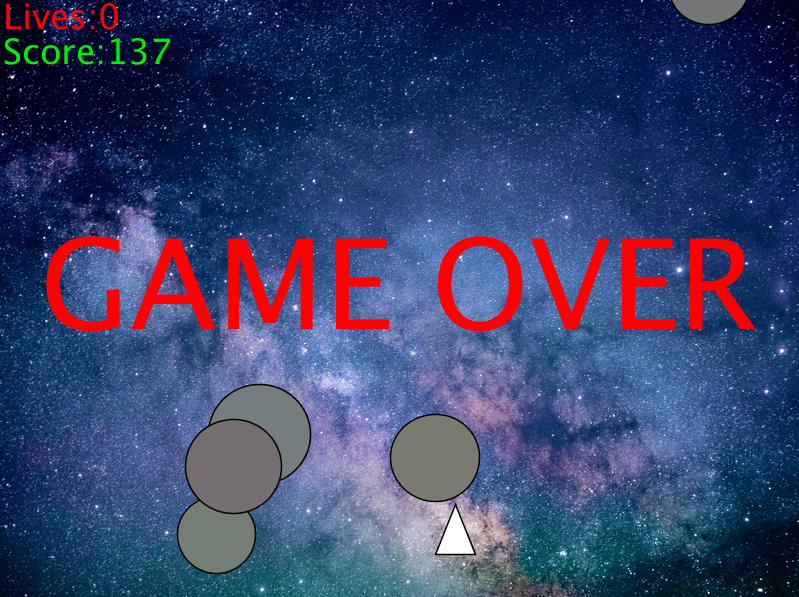
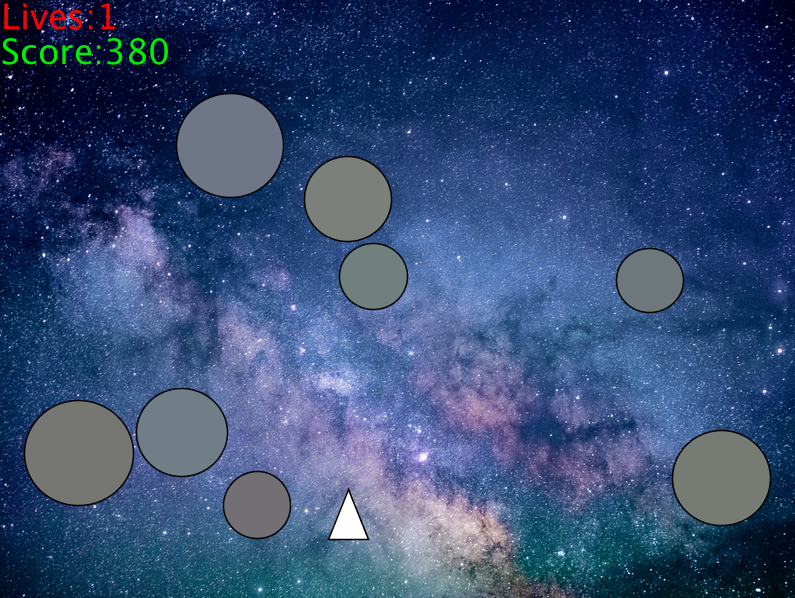
Space Shooter Game is a retro-style 2D shooter where the player controls a spaceship and shoots incoming meteors. This project was developed using Processing during the first year of my university studies.
</h3>

<div style="text-align: center;">
  <img src="/images/space_shooter_2.png" alt="Space Shooter Screenshot" />
</div>
<hr />

<h2 id="features">Features</h2>
<ul>
  <li><strong>Spaceship Controls</strong>: Move the spaceship using the arrow keys (left, right, up, down) and shoot lasers with the space bar.</li>
  <li><strong>Retro-style Sound</strong>: Background music and sound effects for shooting and collisions create an immersive experience.</li>
  <li><strong>Score and Lives</strong>: Players start with 3 lives and earn points by destroying meteors. Game over occurs when all lives are lost.</li>
  <li><strong>Random Meteor Generation</strong>: Meteors spawn randomly and increase the challenge over time.</li>
</ul>

<h2 id="game-mechanics">Game Mechanics</h2>
<ul>
  <li>Control the spaceship using the arrow keys to dodge meteors and press the space bar to shoot.</li>
  <li>Earn points by shooting meteors. Each destroyed meteor gives 10 points.</li>
  <li>The player has 3 lives. Collisions with meteors reduce lives, and when lives reach zero, the game is over.</li>
</ul>

<h2 id="prerequisites">Prerequisites</h2>
<ul>
  <li>Processing IDE to run the code file</li>
</ul>

<div style="text-align: center;">
  <img src="/images/space_shooter_1.png" alt="Space Shooter Screenshot" />
</div>

<h1 id="contact">Contact</h1>
<h5 id="for-any-inquiries-or-feedback-feel-free-to-reach-out-to">For any inquiries or feedback, feel free to reach out to:</h5>

<p><strong>Jevgenij Ivanov</strong> <br />
<strong>Email</strong>: ladnopokaa@gmail.com <br /><br />
<strong>GitHub</strong>: https://github.com/Ladnopoka <br />
<strong>itch.io</strong>: https://ladnogames.itch.io/ <br />
<strong>YouTube</strong>: https://www.youtube.com/@LadnoDev <br />
<strong>X</strong>: https://x.com/Ladnopokaa <br />
<strong>Discord</strong>: https://discord.gg/BPsncTZe</p>]]></content><author><name>Jevgenij Ivanov</name></author><category term="games" /><summary type="html"><![CDATA[GitHub Repository]]></summary></entry><entry><title type="html">File Converter</title><link href="https://ladnopoka.github.io//software/2023/04/01/file-converter.html" rel="alternate" type="text/html" title="File Converter" /><published>2023-04-01T00:00:00+00:00</published><updated>2023-04-01T00:00:00+00:00</updated><id>https://ladnopoka.github.io//software/2023/04/01/file-converter</id><content type="html" xml:base="https://ladnopoka.github.io//software/2023/04/01/file-converter.html"><![CDATA[<div style="text-align: center; margin-top: -30px; margin-bottom: 25px; scale: 1">
  <a href="https://github.com/Ladnopoka/FileConverter" target="_blank" class="btn btn-primary" style="padding: 10px 20px; font-size: 1.2em;">GitHub Repository</a>
</div>

<h1 id="file-converter">File Converter</h1>
<h3 style="font-size: 25px">
The File Converter is a C# project designed to convert files between several formats, including JSON, CSV, Markdown (MD), and HTML. This project was developed during my university studies and tested on Windows 10 using Visual Studio Code.
</h3>

<h2 id="features">Features</h2>
<ul>
  <li><strong>Format Conversion</strong>: Convert files between CSV, JSON, MD, and HTML formats.</li>
  <li><strong>Console Application</strong>: Accepts input and output file paths through the command line, making it easy to automate conversions.</li>
  <li><strong>Error Handling</strong>: Detects and handles incorrect file paths and formats.</li>
  <li><strong>Helper Commands</strong>: Provides various commands such as <code class="language-plaintext highlighter-rouge">-verbose</code>, <code class="language-plaintext highlighter-rouge">-list-formats</code>, and <code class="language-plaintext highlighter-rouge">-help</code> for better user interaction.</li>
  <li><strong>Cross-format Parsing</strong>: Parses and extracts data from supported file formats and outputs them in the desired format.</li>
</ul>

<h2 id="supported-formats">Supported Formats</h2>
<ul>
  <li><strong>CSV</strong>: Converts to and from CSV files.</li>
  <li><strong>JSON</strong>: Parses JSON files and outputs them into other formats or converts files into JSON.</li>
  <li><strong>HTML</strong>: Supports HTML table parsing and conversion.</li>
  <li><strong>Markdown (MD)</strong>: Handles Markdown file format for conversion to/from other types.</li>
</ul>

<h2 id="command-line-options">Command-Line Options</h2>
<ul>
  <li><code class="language-plaintext highlighter-rouge">-v | -verbose</code>: Enables verbose mode, providing detailed output during file conversion.</li>
  <li><code class="language-plaintext highlighter-rouge">-o &lt;file&gt; | -output=&lt;file&gt;</code>: Specifies the output file.</li>
  <li><code class="language-plaintext highlighter-rouge">-l | -list-formats</code>: Lists all the available formats (CSV, JSON, HTML, MD).</li>
  <li><code class="language-plaintext highlighter-rouge">-h | -help</code>: Displays the help menu with available options.</li>
  <li><code class="language-plaintext highlighter-rouge">-i | -info</code>: Shows version information of the program.</li>
</ul>

<h2 id="prerequisites">Prerequisites</h2>
<ul>
  <li>Visual Studio Code or any C# compatible IDE.</li>
  <li>.NET runtime installed on your machine.</li>
</ul>

<h2 id="how-to-use">How to Use</h2>
<p>Run the application through the command line by specifying an input file, an output file, and optional flags:
bash
dotnet run input.csv output.json -v</p>

<h1 id="contact">Contact</h1>
<h2 id="for-any-inquiries-or-feedback-feel-free-to-reach-out-to">For any inquiries or feedback, feel free to reach out to:</h2>

<p><strong>Jevgenij Ivanov</strong> <br />
<strong>Email</strong>: ladnopokaa@gmail.com <br /><br />
<strong>GitHub</strong>: https://github.com/Ladnopoka <br />
<strong>itch.io</strong>: https://ladnogames.itch.io/ <br />
<strong>YouTube</strong>: https://www.youtube.com/@LadnoDev <br />
<strong>X</strong>: https://x.com/Ladnopokaa <br />
<strong>Discord</strong>: https://discord.gg/BPsncTZe</p>]]></content><author><name>Jevgenij Ivanov</name></author><category term="software" /><summary type="html"><![CDATA[GitHub Repository]]></summary></entry><entry><title type="html">SVG Shape Generator</title><link href="https://ladnopoka.github.io//software/2023/03/23/svg-shape-generator.html" rel="alternate" type="text/html" title="SVG Shape Generator" /><published>2023-03-23T00:00:00+00:00</published><updated>2023-03-23T00:00:00+00:00</updated><id>https://ladnopoka.github.io//software/2023/03/23/svg-shape-generator</id><content type="html" xml:base="https://ladnopoka.github.io//software/2023/03/23/svg-shape-generator.html"><![CDATA[<div style="text-align: center; margin-top: -30px; margin-bottom: 25px; scale: 1">
  <a href="https://github.com/Ladnopoka/SVG_Shape_Generator" target="_blank" class="btn btn-primary" style="padding: 10px 20px; font-size: 1.2em;">GitHub Repository</a>
</div>

<h1 id="svg-shape-generator">SVG Shape Generator</h1>
<h3 style="font-size: 25px">
The SVG Shape Generator is a C# project designed to create and manipulate SVG shapes such as circles, rectangles, ellipses, polygons, lines, and more. This tool allows users to generate random shapes, group them, modify their properties, and export them to an SVG canvas. Developed and tested on Windows 10 using Visual Studio Code.
</h3>

<h2 id="features">Features</h2>
<ul>
  <li><strong>Shape Creation</strong>: Create a variety of SVG shapes such as circles, rectangles, polygons, and lines.</li>
  <li><strong>Shape Management</strong>: Read, update, and delete shapes. Modify shape parameters like position, size, stroke, and fill.</li>
  <li><strong>Group and Style</strong>: Group shapes and apply styles like colors, stroke-width, and transformations (rotate, scale, skew).</li>
  <li><strong>Export to SVG</strong>: Export all shapes to an SVG file with customizable z-index for layering shapes.</li>
  <li><strong>Random Shape Generation</strong>: Generate shapes with random parameters and colors.</li>
  <li><strong>Text Addition</strong>: Add random or default text with various styles and fonts to the SVG canvas.</li>
</ul>

<h2 id="supported-shapes">Supported Shapes</h2>
<ul>
  <li><strong>Circle</strong>: Generates circles with customizable position, radius, stroke, and fill.</li>
  <li><strong>Rectangle</strong>: Creates rectangles with customizable width, height, and colors.</li>
  <li><strong>Ellipse</strong>: Allows for the creation of ellipses with adjustable radii.</li>
  <li><strong>Line</strong>: Draws lines between two points with customizable stroke.</li>
  <li><strong>Polyline</strong>: Generates complex shapes by connecting multiple points.</li>
  <li><strong>Polygon</strong>: Creates polygons by connecting multiple points with edges.</li>
  <li><strong>Path</strong>: Allows for drawing custom paths with complex commands.</li>
</ul>

<h2 id="prerequisites">Prerequisites</h2>
<ul>
  <li>Visual Studio Code or any C# compatible IDE.</li>
  <li>.NET runtime installed on your machine.</li>
</ul>

<h2 id="how-to-use">How to Use</h2>
<p>Run the application through the command line. You will be prompted to choose an operation to perform:
bash
dotnet run</p>

<ol>
  <li>Create a Shape</li>
  <li>Display a Shape</li>
  <li>Update a Shape</li>
  <li>Delete a Shape</li>
  <li>Create a Default Shape</li>
  <li>Group Shapes</li>
  <li>Ungroup Shapes</li>
  <li>Add Style to Group</li>
  <li>Add Text</li>
  <li>Export to SVG and finish</li>
</ol>

<h1 id="contact">Contact</h1>
<h2 id="for-any-inquiries-or-feedback-feel-free-to-reach-out-to">For any inquiries or feedback, feel free to reach out to:</h2>

<p><strong>Jevgenij Ivanov</strong> <br />
<strong>Email</strong>: ladnopokaa@gmail.com <br /><br />
<strong>GitHub</strong>: https://github.com/Ladnopoka <br />
<strong>itch.io</strong>: https://ladnogames.itch.io/ <br />
<strong>YouTube</strong>: https://www.youtube.com/@LadnoDev <br />
<strong>X</strong>: https://x.com/Ladnopokaa <br />
<strong>Discord</strong>: https://discord.gg/BPsncTZe</p>]]></content><author><name>Jevgenij Ivanov</name></author><category term="software" /><summary type="html"><![CDATA[GitHub Repository]]></summary></entry></feed>